

If you’re exploring content management options and have found that Seismic isn’t the best fit for your organization, there are three main Seismic alternatives to consider: Bigtincan, Showpad, and Highspot.
This article will walk you through how Bigtincan compares to Seismic in five key areas, including:
- Content management and AI-powered search
- Training and coaching with AI enhancement
- Document automation and template creation
- Content governance and approval workflows
- Customization and brand control capabilities
You’ll also get a succinct overview of the Showpad and Highspot platforms and some additional resources to help you learn more about them.
If you have further questions about how Bigtincan can benefit your organization, the easiest and best way to get them answered is by booking a demo.
Bigtincan vs Seismic — how do they compare?
Capability #1: Content management and AI-powered search
Both Bigtincan and Seismic offer robust content management with powerful search capabilities, but they take fundamentally different approaches to helping your team find what they need.
Seismic relies heavily on metadata and tagging to organize content within its folder structure. Its search engine performs well when content is tagged correctly, and it offers extensive filtering tools based on that metadata. If you have excellent content governance controls in place, you're golden. However, that's not the reality for most businesses.
Bigtincan takes a different path with SearchAI, our AI-powered search that performs full-text searches across every document and image without requiring extensive tagging. Instead of forcing you into rigid folder hierarchies, our three-tier system (tabs, channels, stories) lets content live in multiple places simultaneously.
If you compare this system to a physical file management system, the tabs are like a drawer, a channel is a folder, and a story is the document or bundle of documents within the folder. Except in Bigtincan, each file can live as part of multiple stories, channels, or tabs.
SearchAI automatically matches synonyms, identifies relevant file types, and prioritizes results based on your recent activity and successful sales patterns.
For example, you can run a search in natural language like, "Where is my battlecard for X competitor located?" and you'll get an instant response on the location and a link to access the file.
Your buyers can also take advantage of SearchAI in Digital Sales Rooms.
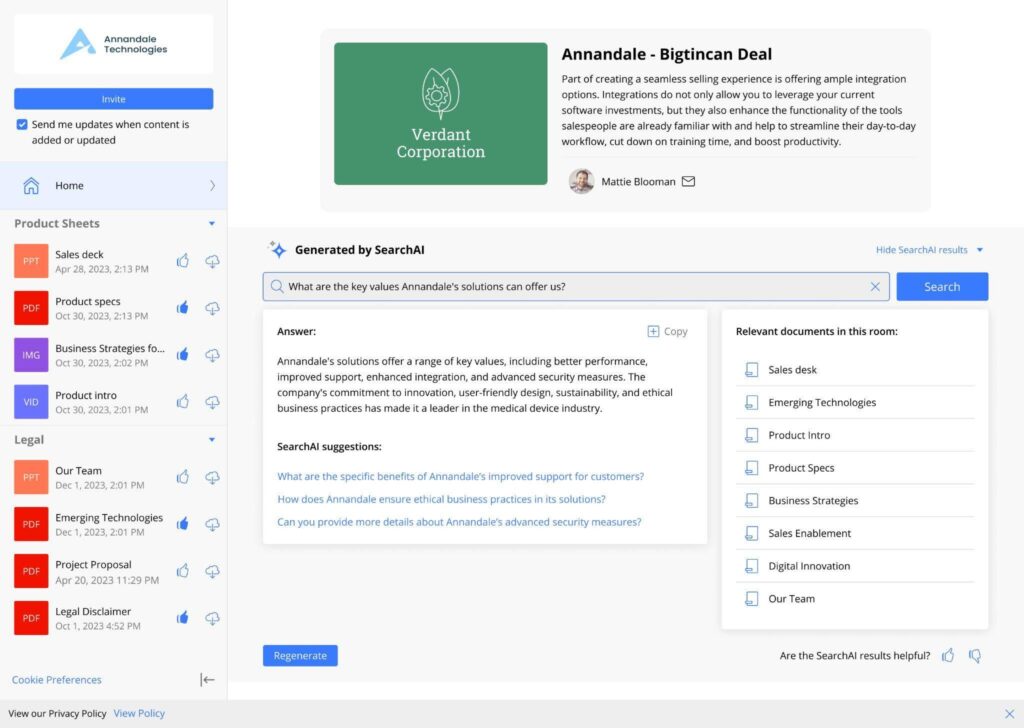
SearchAI in a DSR
At the end of the day, teams save hours on manual tagging and content maintenance. Some Bigtincan clients have avoided hiring full-time data maintenance staff specifically because our AI handles what traditionally required constant human oversight.
Capability #2: Training and coaching with AI enhancement
As both platforms are directed toward sales teams, they recognize the importance of training and coaching.
Despite that, many users report that Seismic's training capabilities fall short in many cases. They acquired Lessonly back in 2021, but they still don't offer extensive reporting or flexibility to create custom training materials. Their training focuses on playbooks, customized content creation, and basic video assessment.
But Bigtincan Readiness (powered by our Brainshark acquisition) offers significantly more depth and AI integration than Seismic's approach. We offer three key AI features that change how you train and coach your reps:
RolePlayAI
RolePlayAI gives your reps the ability to practice real-time text and audio conversations with AI that accurately takes on buyer personas and concerns. Unlike traditional roleplaying, which depends on whether your managers are available, reps can practice anytime with scenarios that change every time — no two conversations are identical.
Sales managers and enablement teams set up roleplay exercises by defining the following:
- Personas
- Products/services
- Objectives
- Difficulty levels
The AI then engages reps in dynamic conversations that make them think on their feet, just like real buyer interactions. Reps get a safe space to practice objection handling, ask discovery questions, and deliver presentations without the pressure of a live audience.
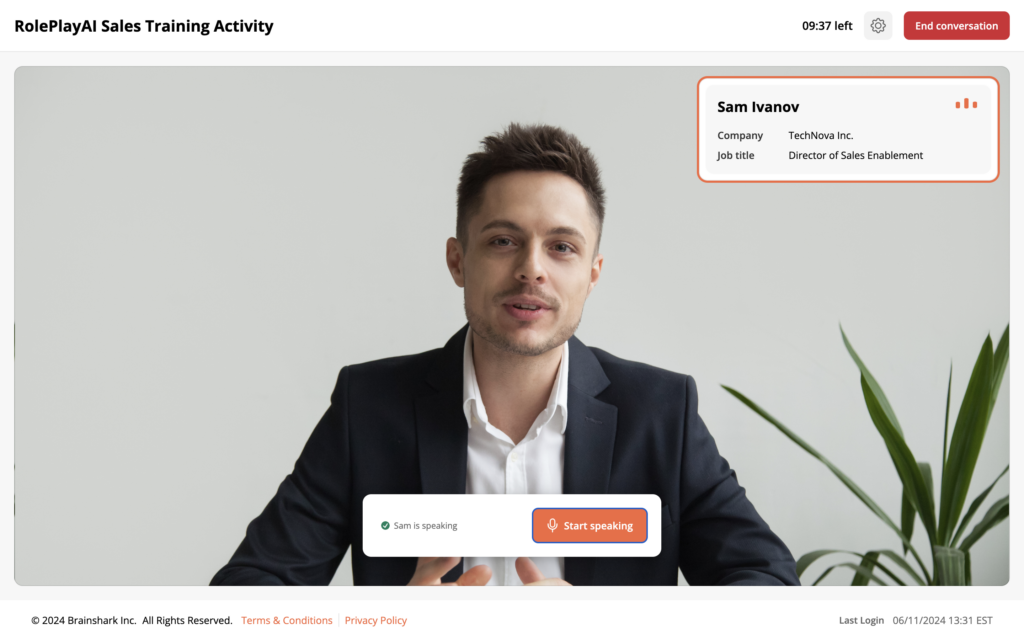
This works particularly well for new hire onboarding and preparing for specific account types. Instead of waiting for the next team meeting to practice a difficult conversation, reps can immediately work through scenarios and build confidence before their next real customer call.
CoachingAI
CoachingAI provides detailed, objective feedback on how reps deliver their messages, going beyond what human coaches can consistently track. The AI analyzes vocal delivery through eight individual metrics, provides tone-of-voice analysis, and tracks topic coverage to show how sellers are likely to be perceived by prospects.
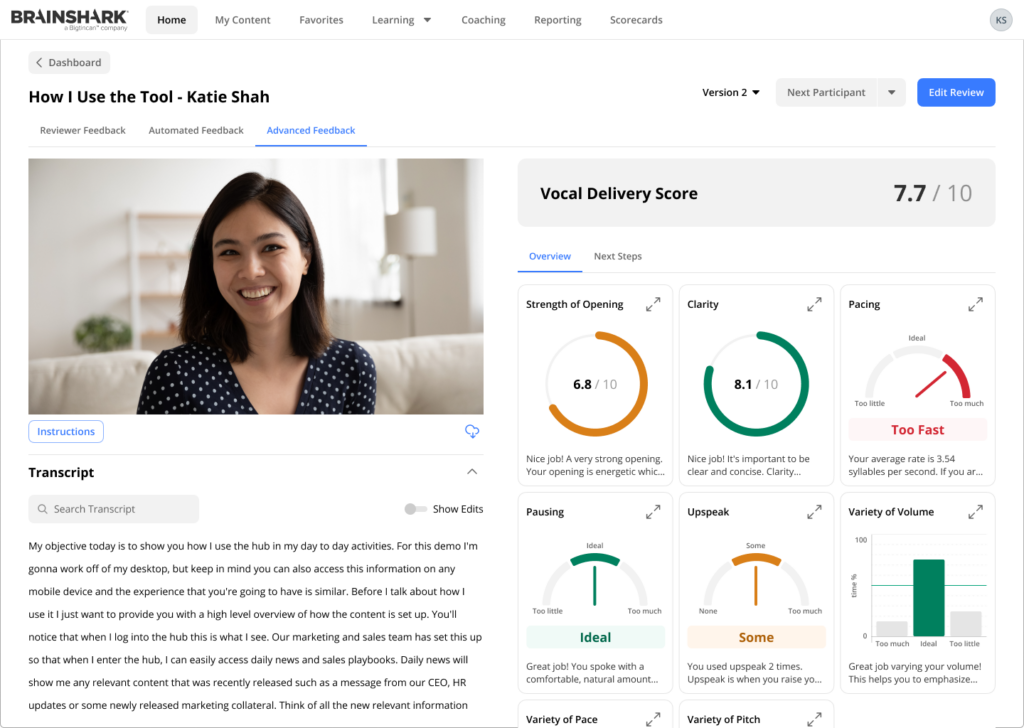
Sales reps submit video recordings of pitches or presentations, and CoachingAI generates specific feedback on speaking pace, filler word usage, vocabulary level, and overall impression based on body language and vocal tone. This provides reps with actionable insights they can work on independently while managers receive AI scoring to identify who needs additional support.
Sales enablement teams use CoachingAI to scale coaching efforts across large teams. Instead of manually reviewing every submission, managers can focus their time on reps who need the most help, while self-motivated reps get immediate feedback to improve on their own.
AuthoringAI
AuthoringAI cuts training content creation time by three to five times (based on our internal data) through realistic AI-generated speech, automatic captioning, and translation capabilities. GTM teams can generate human-sounding narration for presentations without recording audio and easily update voice content when slides change.
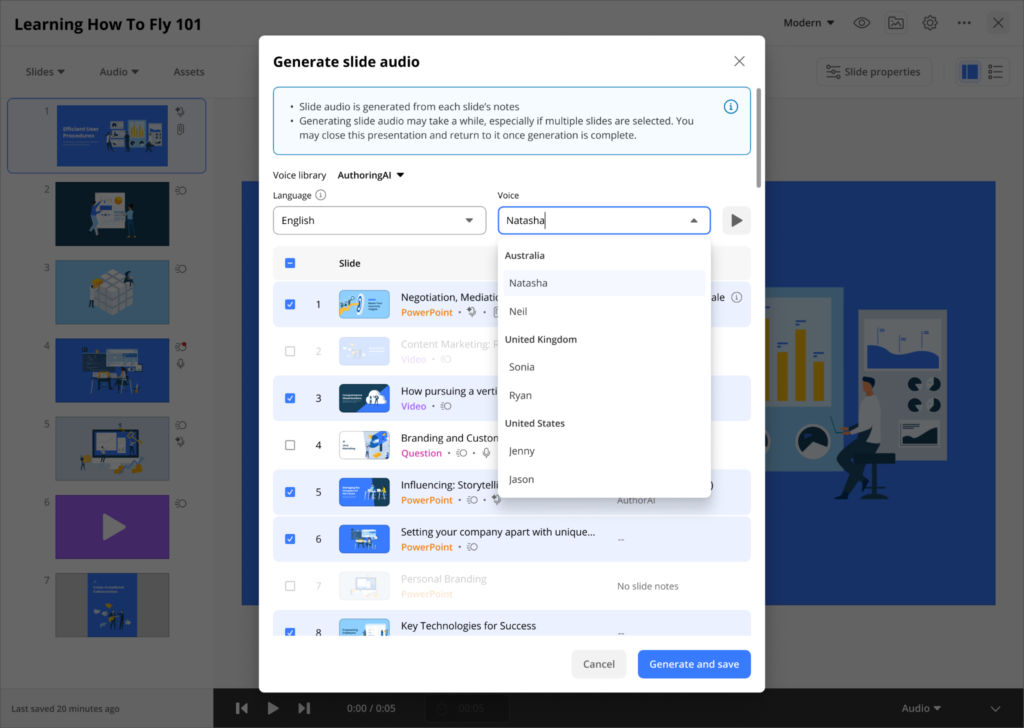
The AI can clone custom voices in 30+ languages across training materials, while auto-generated slide notes make all content searchable through our platform. For global teams, AuthoringAI translates both slide content and narration into multiple languages with native-sounding voices, eliminating weeks or months of traditional translation work.
Training teams and subject matter experts use AuthoringAI to quickly turn existing materials into engaging, narrated content. Instead of coordinating recording sessions and managing audio files with internal or external stakeholders, they can focus on content quality while the AI handles the technical production work.
Capability #3: Document automation and template creation
If you've ever felt frustrated by the complexity of setting up document automation, you're not alone. Both platforms offer these capabilities, but the experience of actually using them day-to-day is quite different.
Seismic's LiveDocs technology can handle complex automation workflows that are impressive on demos. But many teams discover that the power of this capability comes with a steep learning curve and often means you'll be calling their support team (or hiring expensive consultants) every time you need to modify a template or set up something new. This increases your total cost of ownership over time.
Bigtincan takes a different approach because we've seen too many teams get stuck in that cycle of vendor dependency. Our document automation platform uses a user-friendly wizard that requires zero coding knowledge. Yes, we provide comprehensive onboarding support to get you started, but the goal is to make you independent, not dependent.
You can create templates that output to PDF, Word, or PowerPoint, publish directly to your content library, and integrate seamlessly with Salesforce. As a result, you don’t have to submit a support ticket every time you need a new template. Most of our customers manage their ongoing automation needs internally after initial setup, which saves both time and money in the long run.
Capability #4: Content governance and approval workflows
Content governance can feel like walking a tightrope between maintaining control and actually getting content to your sales team when they need it. Both platforms handle this challenge but with very different philosophies.
Seismic offers integrated approval workflows that can work well in highly regulated industries. But adding another approval layer to your existing GTM and compliance processes can create more risk, not less.
If your legal or GTM teams don't know about parallel approval workflows happening in your sales platform, things can get messy quickly.
We've learned that most organizations already have approval processes that work — they need a reliable way to get approved content to their teams quickly. Bigtincan focuses on being the delivery mechanism for content that's already been through your established approval workflows. This reduces compliance risk while ensuring your sales team has immediate access to materials they can confidently share with prospects.
For example, your enablement team can see engagement and usage analytics in Bigtincan Content. Using that data, they can assess if something needs to be updated immediately depending on the relevance of the asset.
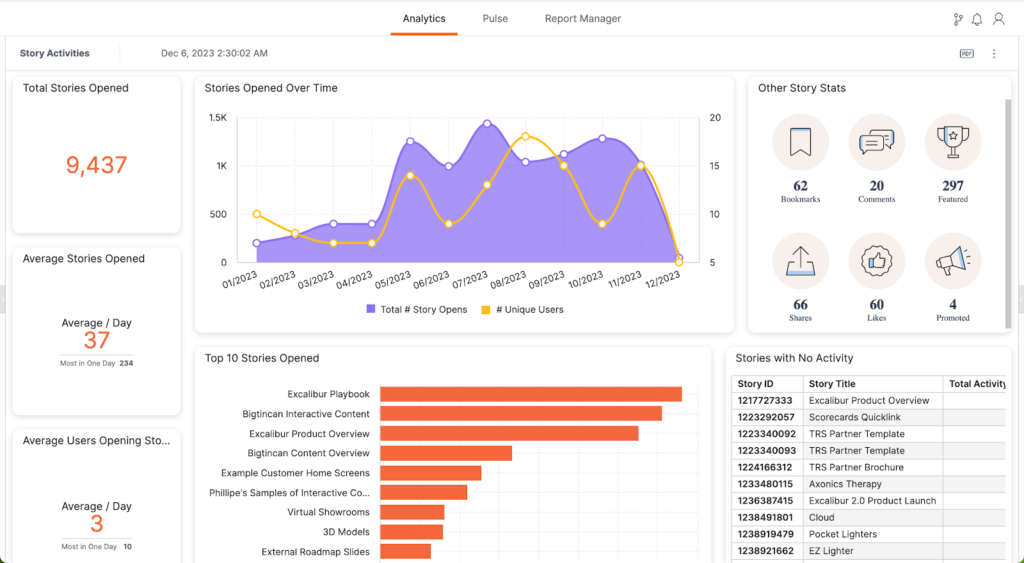
Our governance features handle the important stuff: version control, access permissions, and tracking what gets shared externally. We're not trying to replace your any team's processes — we're making sure they work smoothly with your GTM operations.
Capability #5: Customization and brand control capabilities
How your platform looks and feels to your team, and customers can make or break adoption rates.
If you've been frustrated by Seismic's limited customization options, you already understand why this matters. Being able to add your logo and tweak a few layout elements is better than nothing, but it still feels like using someone else's tool — because you are.
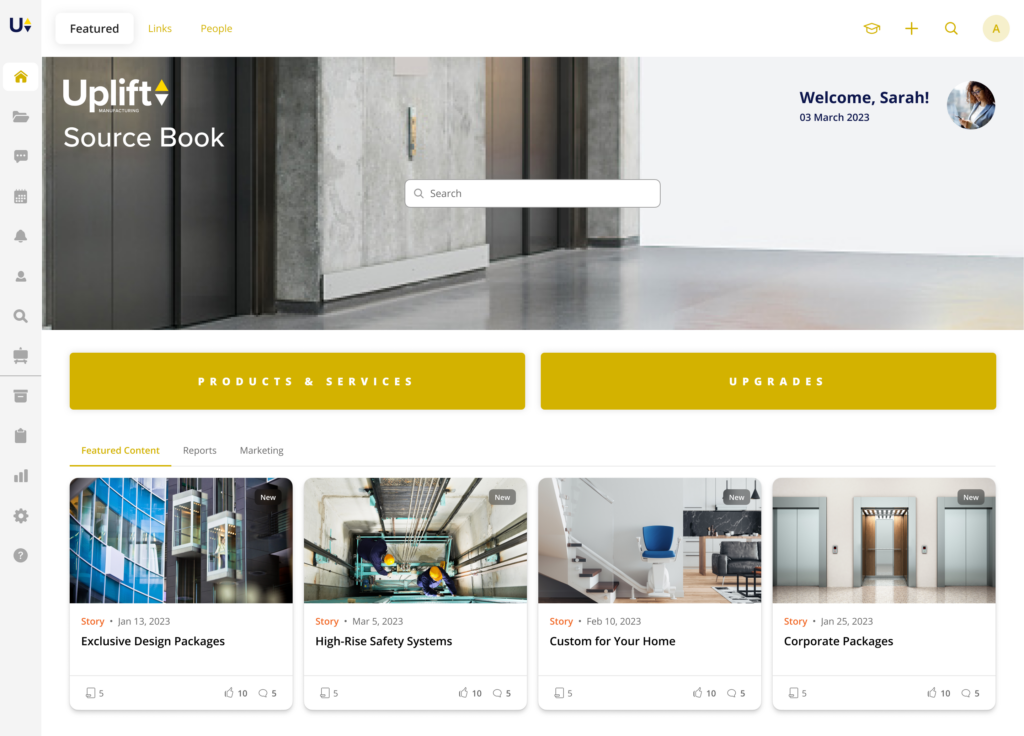
Here's where Bigtincan takes a completely different approach. Your sales platform should feel like it was built specifically for your company, not like a generic tool with your logo slapped on it. Our customization goes down to the pixel level, meaning every color, layout element, and piece of functionality can be tailored to match your brand and workflows.
For example, here’s what the Bigtincan homepage looks like for a manufacturing company:
Here's an example of a modified homepage that might work better for a tech company's workflow:
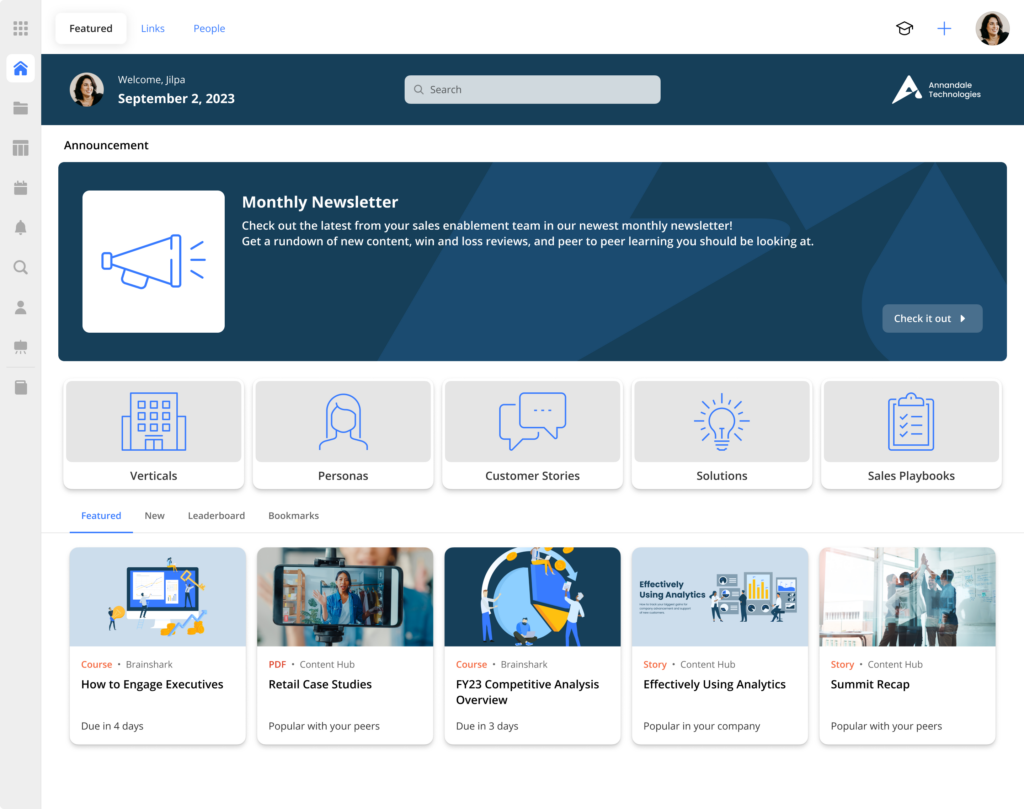
Need your field sales team to track expenses? We'll add a calculator micro-app right to their home screen. Working in retail and need time tracking? We'll integrate a clock-in system. These aren't expensive add-ons or complex integrations — they're part of how we help the platform work the way your team works.
But here's why this matters: when you're sitting across from a prospect discussing a multi-million dollar deal, the platform you're using sends a message. Would you rather show them content through a tool that obviously belongs to another company or through a custom-built solution that reflects your brand and attention to detail? Your prospects notice the difference, even if they don't mention it.
Additional competitive advantages Bigtincan offers
Beyond the direct feature comparisons, some capabilities aren't available with Seismic. Depending on your industry and sales process, they might be exactly what gives your team a competitive edge.
Extended Reality (XR) for memorable buyer experiences
If your team sells complex products that are hard to demonstrate in traditional meetings, XR capabilities can be a game-changer. Bigtincan XR lets your reps drop virtual products into real environments using just their mobile device or guide prospects through immersive Virtual Showrooms they can access on any device.
When your prospect can see how your equipment fits into their facility or walk through a virtual representation of your software interface, they remember that demo differently than they would a standard PowerPoint presentation.
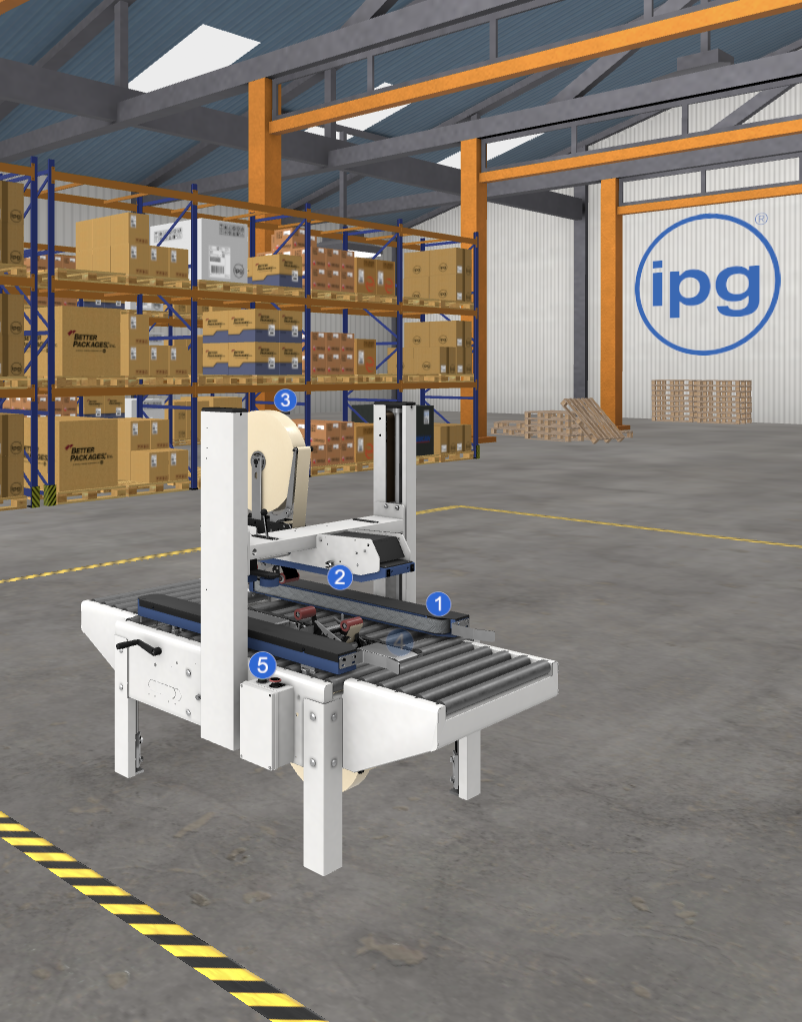
Virtual walkthrough of a new packaging machine on a Bigtincan 3D model
The setup is straightforward: your content/sales team creates experiences through our studio tools, and sales reps access them through the same platform they use for everything else. These experiences integrate with Digital Sales Rooms, so prospects can revisit the immersive demonstration alongside traditional materials after your meeting ends.
MeetingsAI for better call visibility and coaching
If you're a sales manager trying to coach a large team, you know how challenging it's to get real visibility into what's happening during calls. You can't join every meeting, and asking reps to self-report their performance has obvious limitations.
MeetingsAI gives you real-time visibility into your team's calls without requiring another tool in your stack. You can see dashboards of ongoing Teams or Zoom meetings, join calls when deals need support, and get AI-generated summaries with tone-of-voice analysis after calls wrap up.
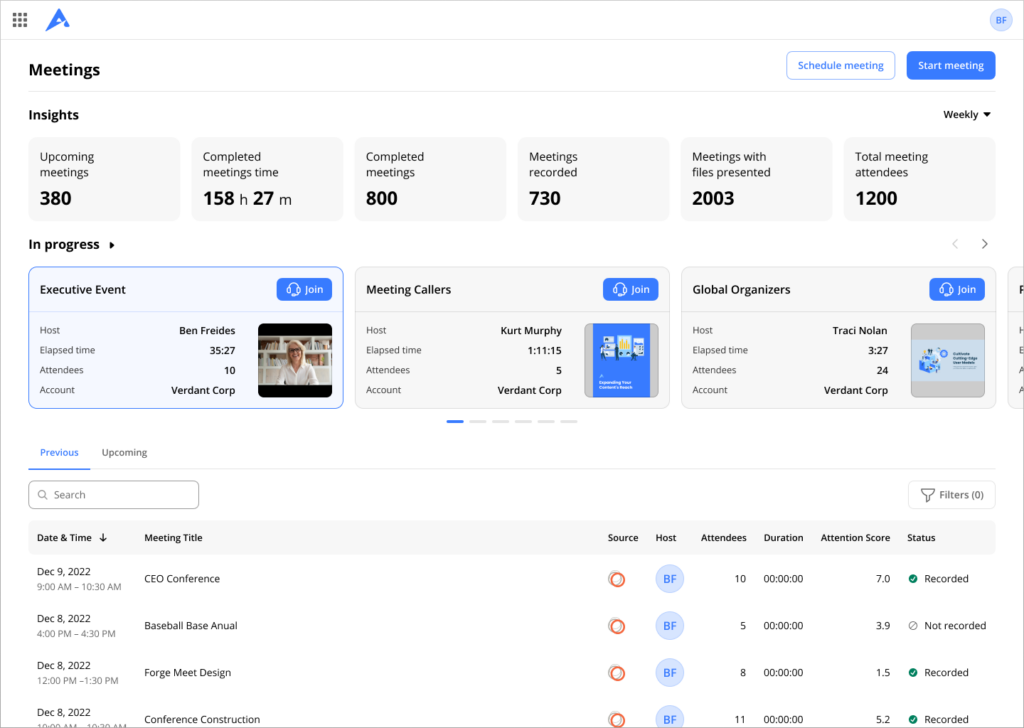
The setup works with your existing meeting platforms, and recordings automatically sync to your CRM alongside any content shared during the meeting. This pairs well with our Readiness Scorecards — you can spot coaching opportunities based on actual call performance and then assign targeted training through the same platform.
Mobile-first design for reps on the move
Every tool on this list, including Highspot and Showpad (mentioned below), offers a mobile app. However, Bigtincan was designed from the ground up for every operating system to include unique features such as:
The ability to integrate with your device's hardware so we can fit all of the most important files on your devices without taking up all of your device's hard drive space.
- 100% offline functionality, including AI-powered search.
- Augmented reality features so you can show prospects what a product would look like in a specific space.
- And more.
Overall, your sales reps will have a very similar experience on Bigtincan mobile without internet access that they would have on a desktop with the internet.
Other Seismic alternatives for sales enablement
Highspot overview
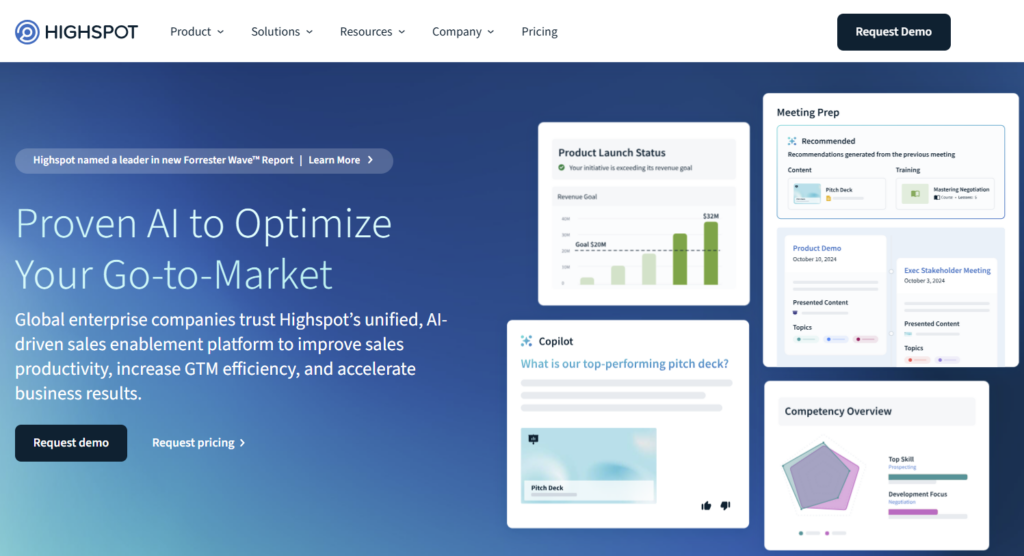
If you're drawn to Highspot's reputation for intuitive design and strong search capabilities, you're responding to what they genuinely do well. Their "spots" approach to content organization feels more flexible than traditional folder structures, and their search functionality is solid once you have content properly organized within their system.
Highspot shines in a few key areas that matter to enterprise teams:
- Their user interface is genuinely modern and easier to navigate than many alternatives, which can speed up adoption.
- They offer good multilingual support for global teams and integrate well with major sales tools.
- Their “Coach in Context” features provide real-time coaching that many managers find helpful.
But here's where teams often hit challenges after the initial honeymoon period. While Highspot's search is good, it's not a full-text search across all your content repositories — it works best when everything is properly tagged and organized within their spots system. Their AI and training capabilities are fairly basic compared to what's available today, which can be limiting if you're looking to do more sophisticated coaching or content creation.
The bigger challenge comes through if you're managing partner sales channels or have complex content governance needs. What feels intuitive for a small team can become unwieldy when you're coordinating across multiple regions, product lines, or channel partners. Their mobile and offline capabilities are also limited, which can be a real problem if your team spends significant time in the field.
Showpad overview
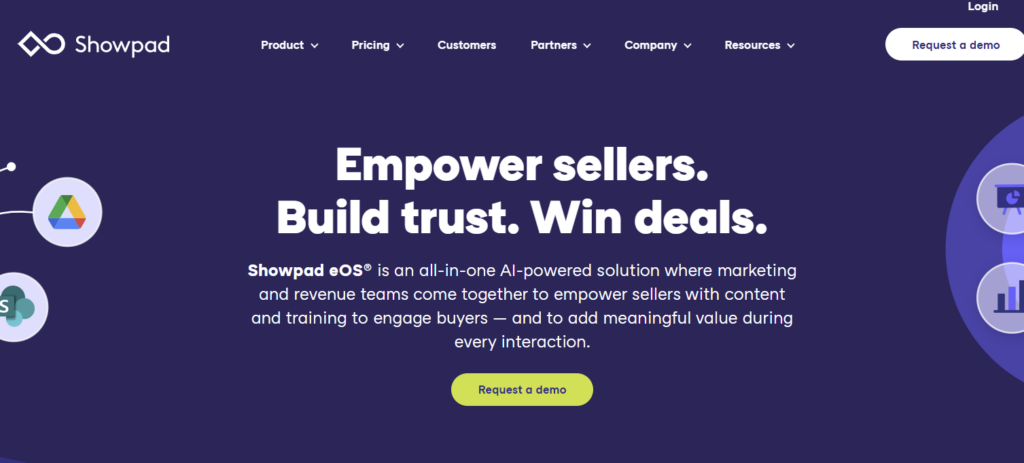
Showpad has built a solid reputation around user experience and training support, particularly in industries such as IT and medical devices, where complex product education is a given. If you're evaluating them, you've likely been impressed by their onboarding process and the visual appeal of their content-sharing features.
Showpad does provide strong training and coaching capabilities, and its support team is known for helping organizations get up and running effectively. Their MeetingIQ feature gives you useful insights into how sales conversations are progressing, and their content-sharing interface is visually engaging in customer meetings.
However, there are some limitations that often surface after implementation. While Showpad's interface looks modern, its backend customization options are more restrictive than what many enterprise teams need. You might find yourself working around the platform rather than having it adapt to your workflows. Also, the content management approach relies on proper folder organization — which is a bottleneck for most teams.
Why Bigtincan is the best Seismic alternative for enterprise teams
Choosing a sales enablement platform feels overwhelming because the stakes are high, and the wrong choice impacts everyone, from your sales reps to your customers. You didn't start this evaluation process because Seismic is a bad platform. You started it because you've hit friction points that are slowing down your team and making daily workflows harder than they should be.
Maybe you're tired of fielding calls from reps who can't find content quickly enough or watching great training programs fail because the platform is too complex for busy sellers to use.
If you're looking for a solution that addresses issues like steep learning curves, mobile limitations, customization constraints, and vendor dependency — Bigtincan is designed to solve that.