
AI is everywhere in sales enablement right now. Some of it is useful. Some of it… looks good in a demo.
In the rush to ship AI, vendors are slapping on new labels and calling it innovation, creating a mixed bag of AI MVPs.
Some are Most Valuable Players: tools that deliver insight, automation, and speed right when you need it.
The others are Minimally Viable Products: just enough functionality to check a box on a roadmap.
One gets you real results. The other gets you a shiny button and maybe some added search functionality.
Here’s how to tell the difference before you waste your money.
What’s an AI MVP?
In traditional product terms, an MVP is a Minimally Viable Product — the simplest version of a solution that still works.
It’s a good concept for iterating on new ideas, but not really the level of quality that you’d want to see in a product you rely on every day.
Unfortunately, that’s where a lot of enablement AI features still land. They’re technically functional — but barely.

But enablement AI doesn’t have to be some clunky bolt-on feature you ignore after the first week.
In fact, it should be your Most Valuable Player.
Think:
- Recommended content showing up directly in a rep’s CRM, based on what’s worked before
- Digital Sales Rooms generated with personalized content in seconds
- AI-generated summaries that help sellers get the critical information they need on the spot
- Performance insights explained in accessible language for busy managers
- Automated coaching with objective feedback — no manager review required
- Presentations and training content produced and translated in minutes, not weeks
Not just “AI is in there somewhere.” Actual, usable functionality — the kind your team would miss if it disappeared.
How do you know you’ve found an enablement AI Most Valuable Player?
If it doesn’t remove work or improve results, it isn’t an MVP. Here’s what to look for:
- Contextual intelligence
The AI should understand what matters based on your role, goals, and pipeline. That means surfacing the right piece of content for a specific industry, or prioritizing insights based on what’s worked for similar reps — not dumping a generic list of assets.
- Natural language querying
You shouldn’t need to run reports or build filters to get basic answers. Good enablement AI lets you ask, “Which reps missed onboarding last week?” or “What’s the most-used deck in Q3?”and gives you a usable answer on the spot.
- Actionable recommendations
Insights are only valuable if they drive action. Look for AI that doesn’t just tell you usage dropped — it suggests which content to update, which reps need coaching, or what to send next based on buyer behavior.
- Embedded in workflows
You shouldn’t have to open a separate window or application just to “use AI.” The best tools show up where your team already works — in the CRM, in Slack, in content search, on mobile devices — without interrupting their flow.
- Automates real work
AI is supposed to take things off your plate. That could mean auto-scoring pitch practice, generating a training script, or pulling together a project plan for your next SKO. If it’s not saving you hours, it’s not pulling its weight.
- Trustworthy data access
Your sales AI assistant should only pull from approved content and data — not random documents. Otherwise you might as well just be using ChatGPT.
Bonus points if the AI can summarize that content in seconds and show you exactly where it got its answers.
These aren’t stretch goals. They’re baseline expectations for AI that’s actually ready to use.
The 5 red flags of minimally viable AI products
Most enablement AI demos look the same. These red flags help you spot the difference between a working product and a well-rehearsed pitch.
1. It has limited functionality that only applies to certain teams or use cases
If the AI only has features that help one role, such as sales or enablement, in limited ways (like search), then you’re probably overpaying and not getting enough value. Anything branded “enablement AI” should have diverse applications across revenue teams and workflows.
2. The assistant is buried in a menu or only accessible to admins
If only your platform owner knows how to access the AI assistant, or it’s hidden five clicks deep, adoption is never going to happen. Real AI MVPs show up where your reps already work, not in a separate tab that no one opens.
3. The answers are generic and not tied to your content or team behavior
If the guidance never changes no matter what your reps are doing, you’re not looking at intelligence — you’re looking at a templated script. Skip.
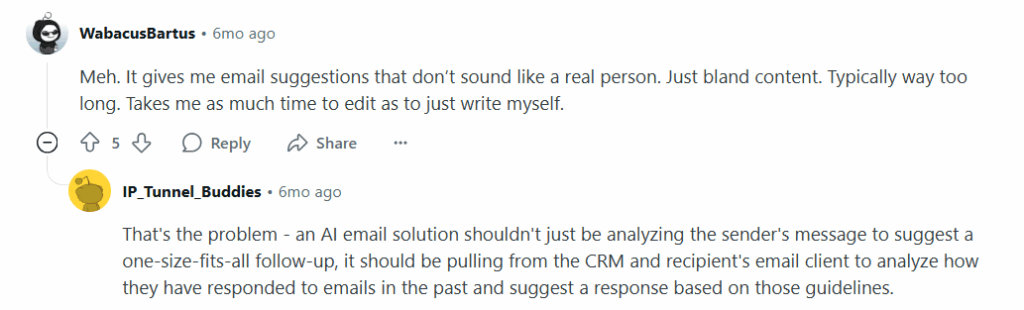
4. The insights state the obvious instead of driving action
If you get “insights” like “engagement is down” with no next step or context, that’s not intelligence. It’s a notification dressed up as strategy.
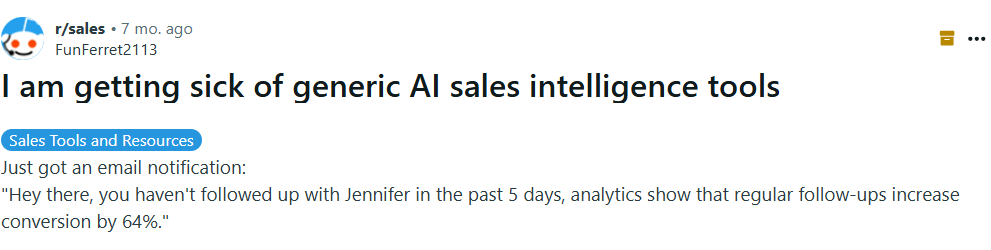
5. The best features disappear after the demo
If the flashy feature set turns out to be a demo environment only — or only works with one preloaded dataset — you’re not looking at a working product. You’re looking at a pitch.


Why this distinction matters now
If you’ve worked in enablement for more than five minutes, you’ve probably seen this cycle before: a new feature gets launched, everyone’s told it’ll change the game, and six months later, no one’s using it.
AI is the latest round of that, but with higher stakes.
Because if you pick the wrong platform, it doesn’t just sit unused. It actively makes things worse. More complexity. More noise. More errors.
And it could also train your team to ignore the tools you roll out.
That’s why the difference between “minimally viable” and “most valuable” matters.
When the AI actually works — when it’s embedded in workflows, learns from your data, and gives you something useful without extra steps — you get real lift.
B2B companies using AI-powered content creation tools saw 32% higher conversion rates and saved six hours a week on average by automating repetitive content work.
That’s not just a marketing win. That’s sales managers getting more time to coach. New reps onboarding faster. Fewer deals stalled because someone couldn’t find the right deck.
But AI that doesn’t change behavior is just shelfware with a buzzword.
| Feature | Minimally Viable Product | Most Valuable Player |
| Functionality | Technically works in some use cases, probably just for sellers | Solves a number of real problems for enablement, sales, and marketing teams (at least) without extra effort |
| Data intelligence | Generic recommendations, limited learning | Learns from your data and adapts to your workflows |
| User experience | Buried in a menu, admin-only access | Embedded in daily tools your team already uses, accessible on multiple devices |
| Insights | Surface-level stats, obvious notifications | Actionable recommendations tied to real behavior, allows user to dive deeper into data with simple chat interactions |
| Time savings | Requires extra steps to get value | Saves hours every week by automating repetitive work |
| Trust and transparency | Feels like a black box | Explains where its answers come from |
| Adoption | Demo-only hype, low usage post-launch | Used and valued by reps, managers, and enablement |
| Governance and control | Hard to configure or govern | Scoped to approved content, fully configurable |
| Scalability | Needs too much human oversight to really scale efforts | Reliably scales training, content creation, customer engagement, and other critical enablement initiatives |
| Outcomes | Adds complexity without impacting outcomes | Drives better execution across the team |
Questions to ask when evaluating enablement AI tools
Plenty of platforms say they’re “AI-powered.” Fewer can show how that AI actually makes work easier.
These questions can help cut through the noise:
Can anyone use this AI, or only analysts? If it requires a data background to get value from it, that’s a no-no.
Is the AI embedded in everyday workflows, or is it a separate tool? If reps or managers have to go looking for it, usage will drop fast.
Can it answer natural-language questions like, “Which reps haven’t completed training this month?” You shouldn’t need to build a report or click through three filters.
Does it proactively surface insights, or do you have to prompt it for everything? AI should flag issues and recommendations before you go digging for them.
What kind of work can it automate today, not six months from now? Look for things like content search, coaching feedback, reporting, text and/or audio translation, or onboarding tasks.
Does it learn from our data, or just apply generic best practices? If it’s not adapting to how your team sells, it’s not enabling anything much.
Can it explain where its answers are coming from? If the AI can’t show its work, your team won’t trust the output.
What data does it have access to, and how is that access scoped? It should only pull from approved content and relevant systems, or you’ll risk misinforming your team.
How long does it take to get usable outputs after implementation? You shouldn’t need a months-long onboarding process just to get value.
What controls do admins and managers have over what the AI does? You should be able to configure it, refine it, and make sure it aligns with how your team works.
How do we measure whether the AI is actually working? Ask how other customers track adoption, time savings, or impact on rep performance.
How does the AI adapt to different roles — rep, manager, enablement, ops? The AI should surface different insights depending on who’s asking.
Can it identify patterns across tools, not just within one platform? If it only works inside a silo, it’s not giving you the full picture. Look for cross-system insights across tools like LMS, CRM, and CMS.
Does it support compliance and content governance rules? If it suggests the wrong version of a deck or surfaces outdated messaging, it’s a liability.
What ongoing training or tuning is required, and who owns that? Some AI tools drift without updates. Know who’s responsible for keeping it accurate and relevant.
Go beyond viable. Aim for valuable enablement AI.
The hard part isn’t finding an AI tool for your revenue teams. It’s finding one that’s actually worth using.
The best enablement AI doesn’t just tick the “AI-powered” box. It answers real questions. Automates real work. Helps real people move faster and make better decisions.
That’s what separates a functional feature from a real MVP.
Want to see what that looks like in action? We’d love to show you GenieAI.